Tuesday, 26 February 2013

Annie Leibovitz - Women Photo Book


 "The photographs by Annie Leibovitz in Women, taken especially for the book, encompass a broad spectrum of subjects: a rap artist, an astronaut, two Supreme Court justices, farmers, coal miners, movie stars, showgirls, rodeo riders, socialites, reporters, dancers, a maid, a general, a surgeon, the First Lady of the United States, the secretary of state, a senator, rock stars, prostitutes, teachers, singers, athletes, poets, writers, painters, musicians, theater directors, political activists, performance artists, and businesswomen. "Each of these pictures must stand on its own," Susan Sontag writes in the essay that accompanies the portraits. "But the ensemble says, So this what women are now -- as different, as varied, as heroic, as forlorn, as conventional, as unconventional as this."


The cover is simple. I would have chosen another colour for the name of the authors or the cover because they are both in grey so it might be confusing. But I would also say that maybe Leibovitz and Sontag chose the same colour for the text and background to emphasize the name of the book and the story behind it as "Women" is written in white. The text is big all over the cover.After seeing the images inside I am glad they didn't choose a image for the cover as it would have ruined the mystery of the story. I reckon you would be intrigued when you see this kind of covers because even though they are simple they have got something to get your attention.


Sunday, 24 February 2013

Helmut Newton - SUMO

 SUMO is a titanic book in every respect: it is a tribute to the twentieth century’s most influential, intriguing and controversial photographer. 

The biggest and most expensive book production in the 20th century!!


"SUMO, edited by June Newton, features a wide selection of over 400 pictures, most of which are published for the first time, covering every aspect of Newton’s outstanding career in photography: from his stunning fashion photographs, which pointed the way for generations of photographers, to his nudes and celebrity portraits."


 First page of the book... I like the size of the font but what I like the most is his signature.It looks so professional!! It looks personalized. It is quite big in the image above I wonder how big it looks in reality considering the fact that the book itself measures 50 x 70 cm and it has approx 30 kg. Wow! I want this book but I definitely can't afford it considering the fact that it's the most expensive production in the 20th century ( holly smokes- it's £ 9,000)


love the 2 pages spread photo

the writing on the left looks perfect with the image on the right

Saturday, 23 February 2013

Helmut Newton - Polaroids Book

Newton specialized in fashion photography but later became well known for his portraits of nude women.

I love his book POLAROIDS :


 This is the cover of the book. I believe it looks good as the white font stands out. Plus, the background colour of the title is orange and that matches with the blue from the image background. I also think that the position of the title is good as the left corner is the only free space let's say.
   The background image is really nice, fashiony.


I must say that I love love love the inside. Text wise it is written the place, year or the magazine for which Newton was commissioned. I love the hand writing and the images. It looks like a critical journal where he stuck his images and wrote all those details. It looks more personal. I am starting to like Polaroids more and more. I like manual things so I would be up for that.
Also, it's only one image per page..there is a lot of white space left which is good because it gives the viewer the chance to focus more on the actual image whereas if he had 2 or 3 or more pictures on a page it would be too much and confusing.Yes, the last 2 pages have 4 images on a single sheet of paper but those ones are similar and part of the same story which I think is acceptable.

I want to do fashion photography so I am really interested in his work and books as well!

Bill Owens - Suburbia book


The layout is quite simple. The images are a combination of portrait and landscape. I like the fact that the images are big and you can see what is happening. There is text under the images. I can't understand what is all about but I suppose it's about what happens in the images.

The last picture is like a collage of portraits, probably couples with text underneath.It looks more like a family album whilst the first ones more like a project book.

I like the simplicity of the book,images are big enough to see what's in there, the text I suppose is appropriate and the colours look nice.

Wednesday, 20 February 2013

Bill Owens - Suburbia


What I have found really interesting about Owens' project, Suburbia is the caption for every image. The text makes so  much the difference. Let me explain why:


We have these 3 images. When you look at them you would say that for ex in the first one that it's a picture of a family having dinner or whatever. It is something normal, usual. BUT, after you read the caption/text underneath your conception changes radically. Here are the 3 captions:

1st image: "Because we live in the suburbs, we don't eat too much Chinese food. It's not available in the 
supermarkets so on Saturday we eat hot dogs."
2nd image: "I enjoy the suburbs. They provide Girl Scouts, PTA, Little League, and soccer for my kids. The thing I miss most is Black cultural identity for my family. White middle-class suburbia can't supply that. Here the biggest cultural happening has been the opening of two department stores."
3rd image: "How can I worry about the damned dishes when there are children dying in Vietnam."

Let's take the last image: would you ever think that the whole story of the image is about children dying in Vietnam? I would say no. The first things that come into your mind are probably that a woman is holding her baby in her arms, they are in the kitchen where you can see a lot of dirty dishes in the sink. And that's it! 

That shows the fact that sometimes the text makes the difference in your work and it is essential!!! Plus, he's got a book for this project so might be worth having a look at it for my book.

For all the pictures go to Bill Owens

Image and Text

Taryn Simon’s ‘An American Index of the Hidden & Unfamiliar'


©Taryn Simon
©Taryn Simon
©Taryn Simon
©Taryn Simon


Helsinki_Art_Museum_Article_2012.pdf


"Simon admits she is not committed to showing things “just as they are”, allowing a certain
degree of artistic intervention to produce aesthetically alluring images. According to the
artist, the viewer should be seduced by the aesthetics of her images, including the beauty of
an object, person, or place she portrays. However, her photographs would be incomplete
without her lists, information, texts, and other material. Her artistic medium consists of
three equal elements: photography, texts, and graphic design. All play an equal role in the
communication of her subjects. Her text often functions as ’hardcore data’, as she describes
it, coupled with a purposeful abstraction and geometry in the images themselves."


Simon puts a lot of emphasis on the way people look at her "alluring images". Her 
images might express a certain feeling, for example, but after people read the text that's 
attached to the image, they realize that it is not what they were thinking the first time. So, 
for Simon's practice, using text is an important part of her work as text clarifies what the 
images could say wrong or other preconceptions people might have about her work. 

Also, Simon also argues the fact that the viewer can't engage in the photographs and text 
at the same time. She tries to create a tension so that the viewer reads the text and then 
comes back to the images because the viewers become uncertain of what they saw in the
image(s). It is quite strategic!!!


Moving forward

Right, finished with the digital theory so I need to make my book and website then.. Now I am excited!!!

Digital Theory - self reflection

  I have tried to cover some aspects of digital photography in terms of theory about colour space, file formats or colour temperature/white balance.  I have been using Photoshop for a while now so I know some of the things. The images below are just some tests to see the difference in colour temperature.
   In terms of the technical things that I have been looking at, they are not new, I have been told about them last year as well but to be really honest I can't say that I know and I understood everything. It's probably because in lectures we have only been presented the key points of the theory. Yes, our duty is to research and acknowledge all the information but still when you have so little time it's sometimes impossible to go back to all the information from the lectures...
   It's all about our priorities, anyway and what we need and don't.

Practice

I've chosen the resolution, bits and of course it's Adobe 1998. No sharpening-- at the end of all the processes!!!!

Played a bit with the Colour Temperature - White Balance-Custom

blue-ish

magenta

yellow-ish


The last one is technically good in terms of colour temperature. I like it.

Tuesday, 19 February 2013

IMPORTING RAW FILES FROM CAMERA TO PHOTOSHOP


  • Assign Colour Space - Adobe RGB (1998)
  • As a rule of thumb work in 8 bit because most printers can only print 8 bit images.
  • Set resolution to 300 dpi. This is the industry standard for all professional labs.(You can obviously change the resolution later in Photoshop for other image uses.)   
  • The golden rule is: NEVER apply any sharpening until the very end of editing an image.
The choice of file options and their benefits are as follows:

  • DNG (Digital Negative) A RAW file that can opened universally by most applications
  • TIFF - the universal format for printers and labs to export an image from. The colour profile that was originally assigned is embedded in a TIFF. Use this format when sending files for external use. Magazines, labs, etc.
  • JPEG - the universal format for web based applications and emailing. However image data is lost due to compression, not ideal for printing from 
  • PSD (Photoshop) - the best format to edit and retouch in PS. Always edit in this format and then convert to TIFF or JPEG depending on the output nature of image.
To balance exposure and colour temperature in Photoshop you can use:

• Windows: Info, Histogram
• Layers, Channels
• Levels, Curves, Colour Adjustments
• Info Box

Colour Space

Adobe RGB 1998 and sRGB IEC61966-2.1 (sRGB) are two of the most common working spaces used in digital photography.

sRGB is a RGB color space proposed by HP and Microsoft because it approximates the color gamut of the most common computer display devices. sRGB is a RGB color space proposed by HP and Microsoft because it approximates the color gamut of the most common computer display devices. 


Adobe RGB 1998 was designed (by Adobe Systems, Inc.) to encompass most of the colors achievable on CMYK printers, but by using only RGB primary colors on a device such as your computer display. The Adobe RGB 1998 space encompasses roughly 50% of the visible colors specified by CIE.


• RGB or Red, Green and Blue are the primary colours of light, and usually the principal colours we view on a monitor.
• CMYK or Cyan, Yellow, Magenta and Black are primary colours used for all printing techniques.
• Many RGB colours that are viewed on screen cannot be printed to CMYK or vice-versa.

Monday, 18 February 2013

Histograms


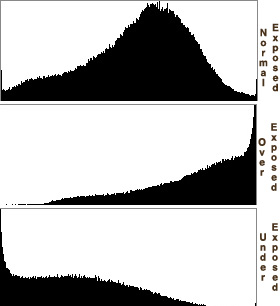
The histogram displays a graph of the current light and dark tonal values. The horizontal axis represents the 256 colours or shades of grey, and the vertical axis represents the amount of pixels in each of those colours. The histogram of an image that has been edited aggressively will have gaps and spikes. These represent lost of tonal details due to the aggressive editing. This is not necessarily a bad thing, more of a creative latitude.

'
TONES

The region where most of the brightness values are present is called the "tonal range." Tonal range can vary drastically from image to image, so developing an intuition for how numbers map to actual brightness values is often critical—both before and after the photo has been taken. There is no one "ideal histogram" which all images should try to mimic; histograms should merely be representative of the tonal range in the scene and what the photographer wishes to convey.


High and Low Key Images


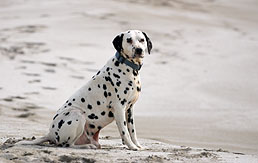
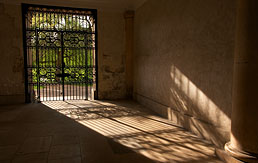
Images where most of the tones occur in the shadows are called "low key," whereas with "high key" images most of the tones are in the highlights.


High Key


Low Key


CONTRAST

Contrast is a measure of the difference in brightness between light and dark areas in a scene. Broad histograms reflect a scene with significant contrast, whereas narrow histograms reflect less contrast and may appear flat or dull. 


End Notes : http://www.cambridgeincolour.com/tutorials/


Dynamic Range


In photography, dynamic range is the difference between the lightest light and darkest dark which can be seen in a photo. Once your subject exceeds the camera's dynamic range, the highlights wash out to white, or the darks become black blobs.


                  White Balance - Colour Temperature


  • Is a measure of a particular light source: light bulb, match, sunlight 
    calculated in Kelvin. 
  • Digital cameras have settings to adapt to each lighting condition to make an image neutral in colour. Analogue film has different chemical properties to adapt to lighting conditions (tungsten, daylight).


A digital camera uses the process of white balancing or WB to adjust
the red, green and blue or colour temperature of an image to create
an accurate white. The camera will also have other colour
temperature settings based on different lighting conditions e.g:
daylight, flash, cloud, tungsten, florescent.


          PRESET WHITE BALANCE SETTINGS


  1. Auto – The Auto setting helps in adjusting the white balance automatically according to the different lighting conditions, but you can try other modes to get better results.
  2. Tungsten – This mode is used for light under a little bulb like tungsten, and it is often used while shooting indoors. The tungsten setting of the digital camera cools down the color temperature in photos.
  3. Fluorescent – This mode is used for getting brighter and warmer shots while compensating for cool shade of fluorescent light.
  4. Daylight – This mode is for the normal day light setting, while shooting outdoors. Many cameras do not have the Daylight mode.
  5. Cloudy – This mode is ideal for while shooting on a cloudy day. This is because it warms up the subject and surroundings and allows you to capture better shots.
  6. Flash – The flash mode is required when there is inadequate lighting available. This mode helps pick the right White Balance under low light conditions
  7. Shade – A shaded location generally produces cooler or bluer pictures, hence you need to warm up the surroundings while shooting shaded objects.
End Notes: http://www.exposureguide.com/white-balance.htm

Saturday, 16 February 2013

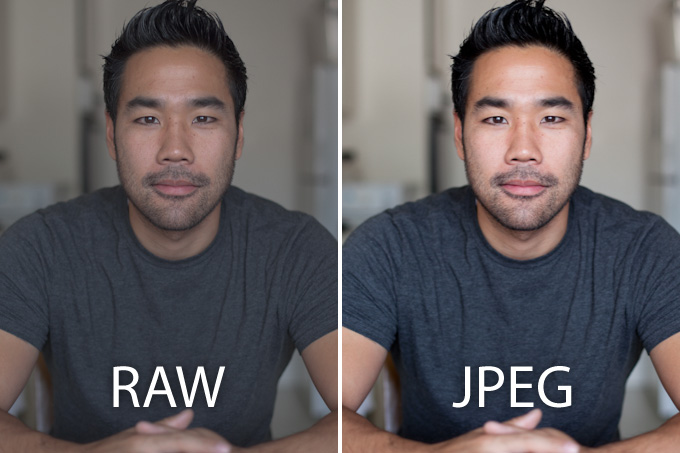
RAW VS. JPG

No lost data
  • RAW files preserve image quality and lose no data irrespective of the number of times they are opened and saved.
  VS.
  • A JPEG image may look fine when it is initially opened, but if it is opened and saved often, it starts to show degradation in quality.

Control of data
  • In the JPEG format, an in-camera computer is programmed to convert the raw data captured by the sensor into an image based on the settings (exposure, contrast, sharpening, saturation, white balance, etc.) existing when the picture is made.
  VS.
  • RAW file conversion, on the other hand, allows the photographer to process all of the original data on a desktop or laptop computer which has considerably more speed and power than the in-camera version.   
www.slrlounge.com 


White Balance

  • The color temperature of the light, and often the mood of an image, is controlled by white balance. If a photographer incorrectly sets the white balance on a camera prior to taking a picture in JPEG format, for example, the die is cast.  The only hope lies in an attempt to adjust color, hue, and/or saturation in Photoshop to correct the error, and there is no guarantee of success.
VS.
  • However, during the process of converting a RAW file into an image, the photographer may reset the white balance to any specific value, just like resetting the white balance before the exposure, without any loss or damage to the underlying data.


Bit Depth


  • JPEGs are 8 bit files, and most RAW files are 12 or 14 bit.  An 8 bit file can measure 256 tonal values in each of the three color channels, or a total of 16.7 million possible colors per pixel.  A 12 bit RAW file, however, can measure 4,096 tonal values per channel, or a total of 68.7 billion possible colors per pixel.
  • A JPEG file, therefore, records considerably fewer tonal values than a RAW file. And the tonal values that it does not record are lost forever.  As a result, the tonal gradations in a JPEG file  are sometimes not smooth.

Exposing to the right

  • Once the highlights are truly clipped, they cannot be recovered.  To avoid this dilemma, it appears logical to underexpose a scene, and later recapture the brightness in processing. 
  • However, as you brighten parts of a scene in shadow, you often introduce "noise" into the image. Some compare noise in digital images to the grain seen in film.  Both increase as light decreases.

cameraguyzack.blogspot.com
End notes: http://www.rondayphotography.com/

From camera to print - colour management

RAW file ?

As I was looking for information on the RAW file I found a definition that caught my attention:

"The RAW file format is digital photography's equivalent of a negative in film photography: it contains untouched, "raw" pixel information straight from the digital camera's sensor."

A digital RAW file is a file containing the unprocessed raw data captured by the sensor in the digital camera at the time of exposure.  The RAW file standing alone does not contain a finished photograph.  To acquire that, the RAW file must first be converted.  Camera settings for color space, sharpness, saturation, and white balance also are not in the RAW file; they are tags which accompany the RAW file through the conversion process.

Examples of camera manufacturer RAW formats:  Nikon .NEF, Canon .CRW, Minolta .MRW, Olympus .ORF, Fuji .RAF,


JPG file?

JPG files, also known as JPEG files, are a common file format for digital photos and other digital graphics. When JPG files are saved, they use "lossy" compression, meaning image quality is lost as file size decreases. JPEG stands for Joint Photographic Experts Group.

just remembered..


   I will do some research on digital theory & practice          
as this is what the module should be about, right?


1. DIGITAL CAPTURE - FROM CAMERA TO SCANNER
 2. DIGITAL CAMERA FILE FORMATS - RAW v JPEG 3. COLOUR TEMPERATURE/WHITE BALANCE
 4. COLOUR SPACE -
THE GAMUT
 5. RAW FILE CONVERTING 6.  COLOUR CORRECTION 

Friday, 15 February 2013

Right....so my task is to create a book and a website. It's gonna take me a while with the website but the book should be easier.

I have never created a book of my own so I don't know exactly where to start from. I probably have to look for inspiration. I will probably use Blurb for my book as I have worked before in Blurb and it is not difficult.

Then, let's look for inspiration.... :)

Sunday, 10 February 2013

Statement of Intent

Sea Gypsies - www.telegraph.co.uk

     This module should be really helpful in learning more technical things in Photoshop or Aperture. I am really hoping that at the end of it my Photoshop knowledge will be better as I like working in Photoshop and this module should be handy.
     Also, regarding the website and the photo book that we have to make, it is a great start to our practice as it is essential as a photographer to have an website so people can look up at your work and hopefully commission you for all sorts of projects. It is also good for another module, Introduction to Professional Practice as we would need a practitioner pack including a photo book and website.
     Creating an website and a photo book shouldn't be too hard but it does take quite a lot of time so sooner the better.
     Very excited at the idea of creating my own website!!  Can't wait to see the final result!!!!

ADI Assignment

2013 Assignment
So this is my assignment for ADI. I have to create a website and a PhotoBook. It is probably not hard but I know for sure it's gonna take me a lot of time. Fingers crossed for me!!!

Sunday, 3 February 2013

Aloha!!

Evening everyooooooone!!! I've finally decided to create a blog! I will use it as my critical journal for one of my lectures called Advanced Digital Imaging!

I hope this blog will make my job easier in terms of (re)searching and acknowledging new information about digital aspects and Photography in general!!!

Let's hope I will have thousands of posts!! Wohoo!! Very exciteeeed!!!